Best Meal Planning App With Grocery List (2026 Rankings)
Your household → seven dinners → shared ingredients → one list
Our #1 pick: SummitPlate for a list built from the whole week
Direct answer: the best meal planning app with a grocery list plans the dinners first, then builds one list. This page is the comparison. The meal-planner page is the workflow, and the AI grocery list generator is the list-from-plan tool. SummitPlate starts with household size, diet and busy-night constraints, then plans seven connected dinners as one unit. Shared proteins, produce and staples connect the nights; duplicate ingredients are collapsed into one list from the full plan.
Current public pages reviewed September 10, 2026. These are publisher-documented workflows, not hands-on comparative tests. SummitPlate publishes this guide and is our editorial pick for connected household dinners. Alternatives are ordered by fit for the tasks below; no numerical scores or universal winner are claimed.
The free preview shows the shape of the week. Paid access unlocks full recipes and the complete grocery list.
What the job requires
A meal planner and grocery list app should connect the dinners before making the list. Whether you call it a meal planner shopping list app or an app for meal planning and grocery list, start with the household week you still need to decide.
Illustrative five-night excerpt
Five dinner decisions. One list to work from.
Five nights from an illustrative week: an example of ingredient reuse, not a generated plan or complete shopping list. Your meals and quantities depend on your household.
- Mon
Chicken & pepper rice bowls
Chicken · peppers · rice
- Tue
Black bean & pepper tacos
Black beans · peppers · tortillas
- Wed
Lemon chicken with broccoli
Chicken · broccoli · lemon
- Thu
Broccoli & black bean rice
Broccoli · black beans · rice
- Fri
Chicken & pepper wraps
Chicken · peppers · tortillas
Shared across the week
- Chicken
- 3 dinners
- Peppers
- 3 dinners
- Rice
- 2 dinners
- Black beans
- 2 dinners
- Broccoli
- 2 dinners
- Tortillas
- 2 dinners
The full plan brings compatible ingredient quantities together. Check your pantry before shopping and review any item marked “Check recipe.”
Start with your householdFrom the plan to your kitchen
Product screens from an example saved week, captured September 9, 2026. Meals, quantities and ingredient counts vary with your plan. These screens show the interface; review your current recipe amounts before cooking.
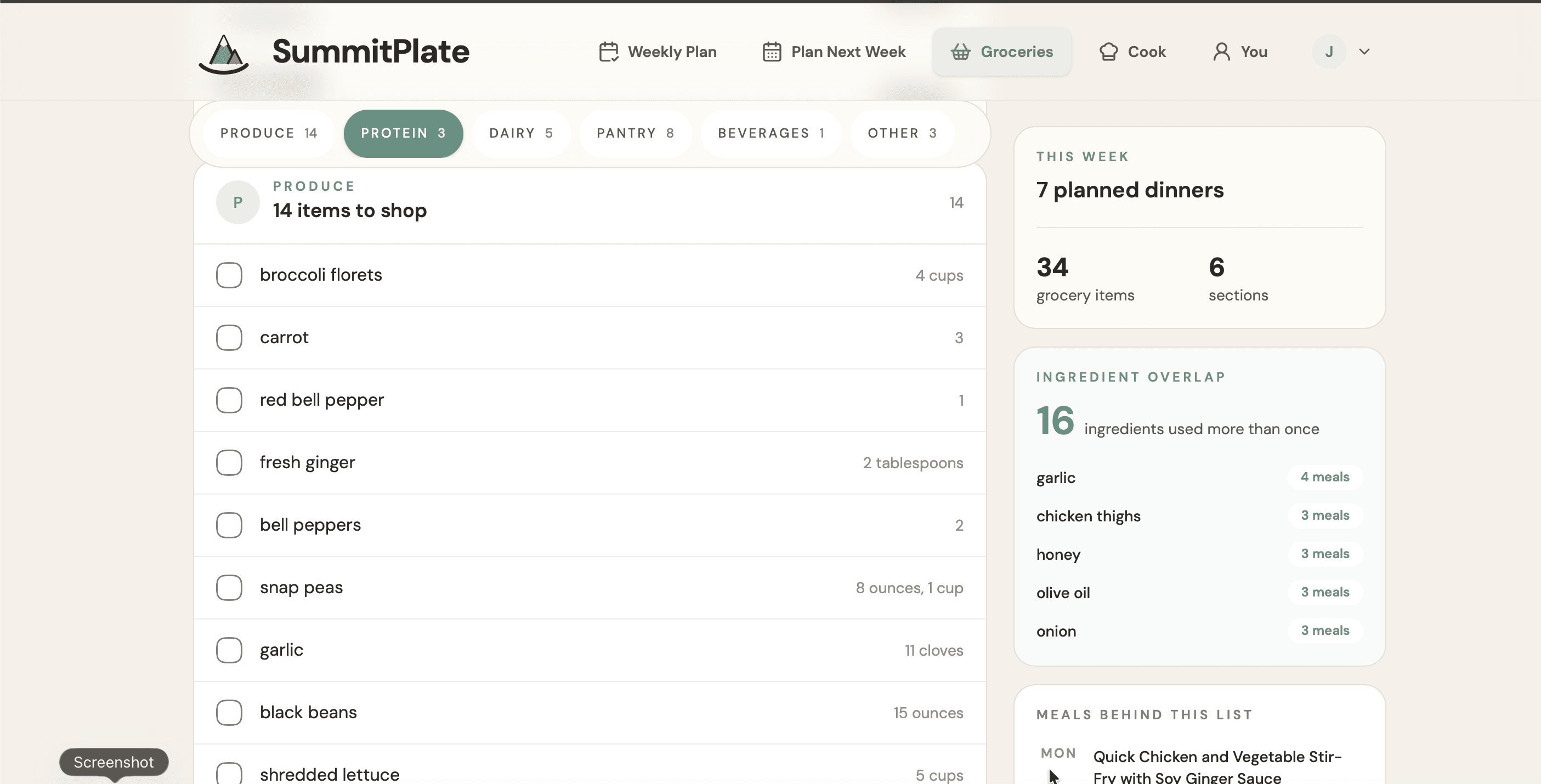
One place to check the groceries
See ingredients by category and which ones appear across multiple dinners. Review any separate units or items marked Check recipe before shopping.
View full-size image: One place to check the groceries (opens in a new tab)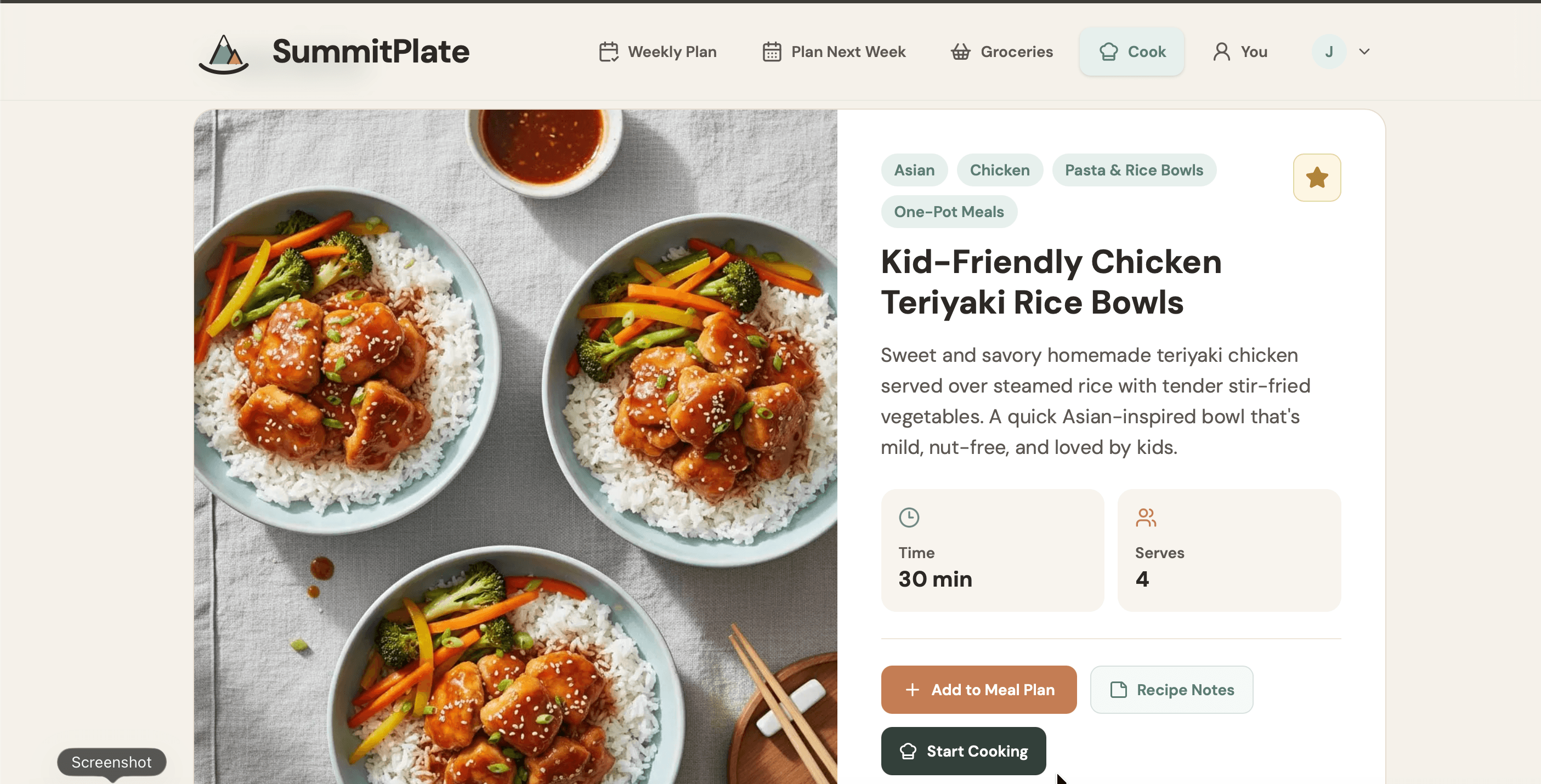
Open a dinner when it is time to cook
The recipe overview shows the dish, time and serving count. Ingredients and cooking instructions continue below the area shown here; a serving label alone does not confirm that legacy recipe amounts have been scaled.
View full-size image: Open a dinner when it is time to cook (opens in a new tab)Compare the list-making job
| App | List from full week? | Overlap / dedupe | Family constraints | Verdict |
|---|---|---|---|---|
| AppSummitPlate — our #1 editorial pick | List from full week?Yes: one list from the full seven-dinner plan; complete list is paid | Overlap / dedupeDeliberate shared ingredients across dinners; duplicate ingredients collapsed | Family constraintsHousehold size, diet and busy-night inputs | VerdictOur pick when dinners and the shopping list both need deciding |
| AppPlan to Eat | List from full week?Automatic list from the recipes on your calendar | Overlap / dedupeRecipe ingredients populate the list; deliberate overlap depends on meals chosen | Family constraintsYou select recipes and serving sizes | VerdictChoose for control over a familiar recipe collection |
| AppEat This Much | List from full week?Premium weekly planner and grocery list | Overlap / dedupeGroceries focus can prioritize repeated foods; reduced variety is a tradeoff | Family constraintsTargets and food preferences shape the plan | VerdictChoose when nutrition targets lead the decision |
| AppMealime | List from full week?Automatic categorized list from selected meals | Overlap / dedupeRecipe ingredients populate the list; deliberate overlap depends on meals chosen | Family constraintsDiet, allergies, dislikes and servings | VerdictShut down on October 21, 2026; recipes continue in Meals Hub |
Current public pages reviewed September 10, 2026. These are publisher-documented workflows, not hands-on comparative tests. SummitPlate publishes this guide and is our editorial pick for connected household dinners. Alternatives are ordered by fit for the tasks below; no numerical scores or universal winner are claimed.
The grocery-list recommendation
#1 SummitPlate: connect dinner decisions to the shop
SummitPlate's list comes after a connected planning step. The seven dinners are chosen as one unit, with ingredient overlap on purpose. Consolidating duplicate ingredients into one list then carries that plan through to shopping.
Those are two different things to check when choosing an app. A combined list tells you how recipe ingredients are gathered. Ingredient overlap tells you whether the meals themselves were planned to share proteins, produce and staples across nights. SummitPlate connects both steps.
It starts with the dinner week your household still has to decide, not fridge inventory. That fits a household whose unresolved work is planning meals and then making the list. Review the free preview for the week's shape; unlock paid access for full recipes and the complete grocery list.
2. Plan to Eat: for your own recipe collection
Save recipes, put them on a calendar and let the list follow the plan. You choose the meals, making it a useful alternative when your family already has favorites. A 14-day trial precedes the subscription. Plan to Eat features
3. Eat This Much: for nutrition-led automatic planning
Its automatic weekly planner and grocery list are Premium features. The Groceries focus can reuse foods more often, with less variety as the tradeoff. Choose it when nutrition targets drive your planning. Weekly planning · Groceries focus
Mealime shut down on October 21, 2026
Mealime’s official transition notice says the app will be discontinued as of October 21, 2026. That date has passed, and Mealime has shut down. Its recipes and planning tools continue in Meals Hub through Albertsons Companies apps and websites. Left Mealime? Our Mealime alternative guide shows what Meals Hub kept and how to rebuild your week.
Planner-and-list app or meal kits?
Choose based on the task you want to keep. If you want a dinner plan and a list to shop from, that is the workflow described here. If what you want is ingredients supplied to you rather than a list for your own shop, evaluate a meal-kit option instead.
Keep the decision focused on whether you want to plan and shop or have ingredients supplied. Compare the current offers against what your household actually needs.
Frequently asked questions
What is the best meal planning app with grocery list for a household?
Our editorial pick is SummitPlate for seven connected dinners shaped by household size, diet and busy-night constraints. It builds ingredient overlap into the week and collapses duplicates into one grocery list. This is SummitPlate's own recommendation, not an independent cross-app test.
Does the free preview include the complete list?
No. The free preview shows the shape of the week. Full recipes and the complete grocery list are paid unlocks.
What should I check about a grocery-list app?
Check whether the list is made from the full plan, whether dinners share ingredients on purpose, whether duplicates are collapsed and what is paid. Those questions are more useful than assuming every app with “grocery list” in its description handles the same workflow.
Where can I compare apps beyond the grocery-list feature?
Use the best meal planning apps comparison for the broader family-weeknight decision. Start there if you want to consider the whole planning job, not just how the shopping list is made. For household dinners, see the meal planning app for families.
Try planning dinner and groceries together
See the meal planner with grocery list for the product workflow, or start with your household and diet to preview the week's shape.