 SummitPlate
Best Meal Planning Apps (2026): Ranked by Who Each App Is For
Your household → seven dinners → shared ingredients → one list
The best meal planning apps for 2026, ranked: 1. SummitPlate, best for planning seven connected household dinners when the week still needs deciding. 2. Plan to Eat, best for recipes you already collect. 3. Eat This Much, best for automatic plans organized around nutrition targets.
Start with the table, then check each app’s limits and the worked SummitPlate example. This guide is published by SummitPlate; the recommendations reflect a family-dinner workflow, not an independent award.
Compare the weekly planning job
| App | Best for | Grocery list | Family/household | Free vs paid clarity | Verdict |
|---|---|---|---|---|---|
| AppSummitPlate — our #1 editorial pick | Best forPlanning seven connected household dinners | Grocery listOne list from the full plan; duplicates collapsed | Family/householdHousehold size, diet and busy-night inputs | Free vs paid clarityFree preview shows the week's shape; paid unlocks full recipes and the complete list. | VerdictOur pick when the dinner week still needs deciding |
| AppPlan to Eat | Best forPlanning with recipes you already collect | Grocery listAutomatic list from the recipes on your calendar | Family/householdYou select recipes and serving sizes | Free vs paid clarity14-day trial; subscription afterward | VerdictChoose for control over a familiar recipe collection |
| AppEat This Much | Best forAutomatic plans organized around nutrition targets | Grocery listPremium weekly planner and grocery list | Family/householdTargets and food preferences shape the plan | Free vs paid clarityFree daily planning; Premium weekly planning and grocery lists | VerdictChoose when nutrition targets lead the decision |
| AppMealime / Meals Hub | Best forBrowse-and-pick dinner planning | Grocery listAutomatic categorized list from selected meals | Family/householdDiet, allergies, dislikes and servings | Free vs paid clarityPro features were free during the wind-down; recipes continue in Meals Hub | VerdictMealime shut down on October 21, 2026; recipes continue in Meals Hub |
Public product documentation checked September 23, 2026. These are documented workflows, not independent hands-on comparative tests. SummitPlate publishes this guide. Choose by the task you need help with; no single app is the best fit for every household.
Illustrative five-night excerpt
Five dinner decisions. One list to work from.
Five nights from an illustrative week: an example of ingredient reuse, not a generated plan or complete shopping list. Your meals and quantities depend on your household.
- Mon
Chicken & pepper rice bowls
Chicken · peppers · rice
- Tue
Black bean & pepper tacos
Black beans · peppers · tortillas
- Wed
Lemon chicken with broccoli
Chicken · broccoli · lemon
- Thu
Broccoli & black bean rice
Broccoli · black beans · rice
- Fri
Chicken & pepper wraps
Chicken · peppers · tortillas
Shared across the week
- Chicken
- 3 dinners
- Peppers
- 3 dinners
- Rice
- 2 dinners
- Black beans
- 2 dinners
- Broccoli
- 2 dinners
- Tortillas
- 2 dinners
The full plan brings compatible ingredient quantities together. Check your pantry before shopping and review any item marked “Check recipe.”
Start with your householdFrom the plan to your kitchen
Product screens from an example saved week, captured September 9, 2026. Meals, quantities and ingredient counts vary with your plan. These screens show the interface; review your current recipe amounts before cooking.
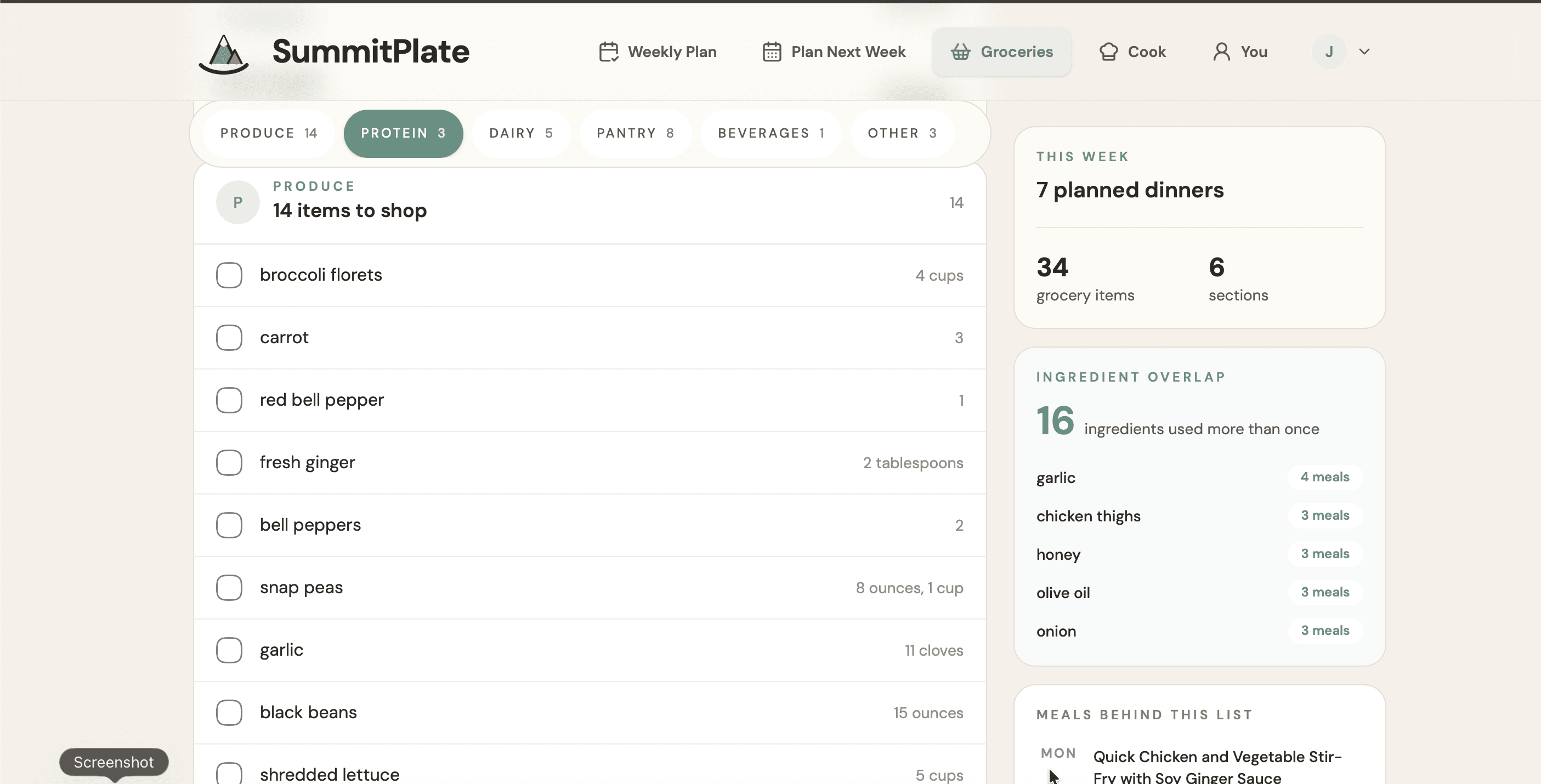
One place to check the groceries
See ingredients by category and which ones appear across multiple dinners. Review any separate units or items marked Check recipe before shopping.
View full-size image: One place to check the groceries (opens in a new tab)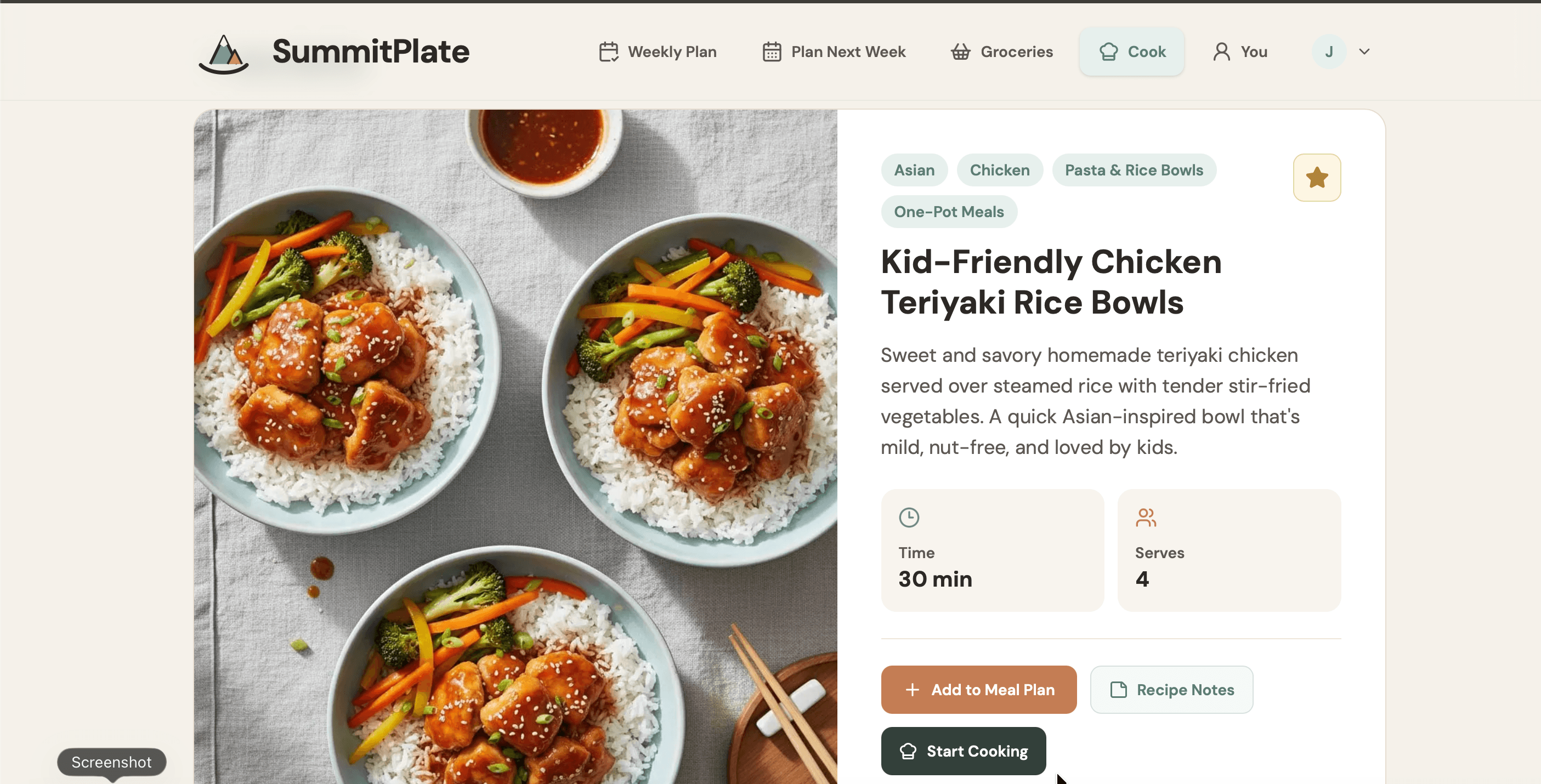
Open a dinner when it is time to cook
The recipe overview shows the dish, time and serving count. Ingredients and cooking instructions continue below the area shown here; a serving label alone does not confirm that legacy recipe amounts have been scaled.
View full-size image: Open a dinner when it is time to cook (opens in a new tab)Our #1 pick: SummitPlate for connected family dinners
SummitPlate starts with household size, diet and busy-night constraints. It plans seven connected dinners as one unit, shares proteins, produce and staples across nights, and collapses duplicate ingredients into one grocery list.
This is SummitPlate's self-published editorial recommendation for that workflow, not an independent test, customer rating or scored award. We are not claiming that every household should choose the same app.
The free preview shows the shape of the week. Paid access unlocks full recipes and the complete grocery list.
What “best” means in this comparison
Our editorial lens is family weeknights and a shoppable list. Ask whether an app starts with your household, connects the dinners, uses ingredients across nights and turns the full plan into one list. Then check what you can actually use before paying.
That is a different decision from choosing a tool mainly for nutrition targets or storing recipes you already know you want to cook. A longer feature list does not answer whether you will still have to assemble the week yourself.
The recommendation and its limits
#1 SummitPlate: plan the week as one unit
Choose SummitPlate when the unanswered question is still “What are we having for dinner this week?” Household inputs shape seven connected dinners. Ingredient overlap happens during planning, before the list is made; duplicate ingredients are then collapsed into one shopping list.
That distinction matters. Combining unrelated recipe lists is not the same as choosing dinners with shared ingredients in the first place. SummitPlate's sequence is household, connected week, overlap, then one list.
Start with the free preview to see the week's shape. Do not mistake that preview for a free complete grocery list or free full recipes. Full recipes and the complete list require paid access; limited dinner revisions are available in the web preview.
2. Plan to Eat: for your own recipe collection
Save recipes, put them on a calendar and let the list follow the plan. You choose the meals, making it a useful alternative when your family already has favorites. A 14-day trial precedes the subscription. Plan to Eat features
3. Eat This Much: for nutrition-led automatic planning
Its automatic weekly planner and grocery list are Premium features. The Groceries focus can reuse foods more often, with less variety as the tradeoff. Choose it when nutrition targets drive your planning. Weekly planning · Groceries focus
Mealime shut down on October 21, 2026
Mealime’s official transition notice says the app will be discontinued as of October 21, 2026. That date has passed, and Mealime has shut down. Its recipes and planning tools continue in Meals Hub through Albertsons Companies apps and websites. Left Mealime? Our Mealime alternative guide shows what Meals Hub kept and how to rebuild your week.
Choose the right next comparison
If grocery spending is your main concern, read our meal planning app for grocery budgets. For the list-specific category, see best with grocery list. To understand the product workflow first, see the meal planner with grocery list.
Left Mealime? See what Meals Hub kept and how to rebuild your week or read the SummitPlate vs Mealime comparison.
Frequently asked questions
What is the best app for meal planning for a busy household?
Our editorial pick is SummitPlate if you want seven connected dinners shaped around household size, diet and busy-night constraints, with ingredient overlap and one grocery list. This is a fit recommendation from SummitPlate, not an independently tested winner across all apps.
How did you rank these apps?
Public product documentation checked September 23, 2026. These are documented workflows, not independent hands-on comparative tests. SummitPlate publishes this guide. Choose by the task you need help with; no single app is the best fit for every household.
Which is the best free option?
Eat This Much offers free daily planning, with weekly planning and grocery lists in Premium. SummitPlate’s free preview shows the week’s shape; full recipes and the complete list require paid access.
Who should skip SummitPlate?
If you only need somewhere to write an already-decided shopping list, you may not need a connected-week planner. If your main task is working through fridge inventory, consider that category instead. SummitPlate starts with the dinner week your household still has to decide.
Which is the best meal planning app with a grocery list?
For a grocery list built from a connected week of dinners, our editorial pick is SummitPlate. The list comes from the full plan, with duplicate ingredients collapsed. The complete list is a paid unlock; the free preview shows the week's shape. See the meal planner with grocery list for that workflow.
See what a connected week looks like for you
Start with your household and diet. Preview the shape of seven connected dinners, then decide whether to unlock the full recipes and complete grocery list.